
Oscar Vail is a seasoned technology expert who has spent years tracking the intersection of software efficiency and consumer hardware. With a professional background rooted in exploring open-source projects and the evolving landscape of robotics, he possesses a unique perspective on how user interfaces shape our daily lives. As Amazon rolls out its most significant Fire TV overhaul in five years, Oscar joins us to discuss the implications of mobile integration, the psychological shift in content discovery, and the technical engineering required to make modern streaming feel instantaneous.
This conversation explores the transition toward “second screen” workflows and the strategic redesign of streaming interfaces to reduce decision fatigue. We delve into how performance gains of up to 30% are achieved on existing hardware and how the expansion of app pinning and voice AI is transforming the television from a simple video player into a central household hub.
Transitioning to a mobile-based “second screen” allows users to browse titles and manage watchlists on a phone before casting them to a TV. What are the specific workflow advantages of this setup, and how does it change how families interact with their shared media libraries?
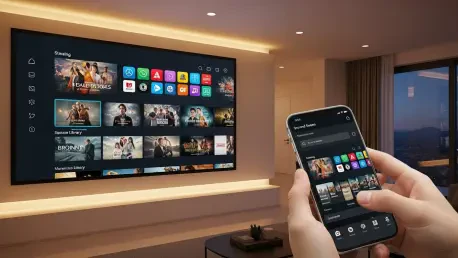
The move toward a “second screen” workflow solves the fundamental friction of the “lean-back” experience where users are forced to navigate complex menus with a clunky directional pad. By shifting the heavy lifting of browsing and watchlist management to a smartphone, the interaction becomes tactile and lightning-fast, mirroring the way we already consume information throughout the day. For a family, this changes the dynamic from a collective, often frustrating struggle over the remote to a more collaborative process where someone can curate the evening’s entertainment privately before casting it to the big screen. It essentially separates the “search” phase from the “viewing” phase, allowing the TV to remain a dedicated space for consumption rather than a source of menu-scrolling fatigue. This setup ensures that when the family finally sits down, the content is ready to play immediately, preserving the communal joy of movie night.
Modern streaming interfaces are currently targeting performance gains of 20% to 30% to ensure a faster user experience. How does a more organized, “cleaner” layout impact user frustration, and what technical hurdles must be overcome to achieve these speed boosts on older hardware?
A cleaner layout is more than just an aesthetic choice; it’s a cognitive relief for users who are often overwhelmed by “choice paralysis” and visual noise. When an interface is optimized, the 20% to 30% gains in speed translate to a near-instantaneous response that makes the technology feel invisible, which is the ultimate goal of any consumer product. The technical challenge lies in the fact that many users are still running older Fire TV Sticks or integrated sets with limited RAM and aging processors. Engineers must strip away redundant background processes and optimize how assets like high-resolution movie posters are cached to ensure that these older devices can handle the new, heavier UI without stuttering. It is a delicate balancing act of delivering a premium, modern look while maintaining a code footprint small enough to run on hardware released several years ago.
Research indicates that many viewers spend roughly 12 minutes simply deciding what to watch. By increasing the number of pinned apps from six to twenty, how do you expect navigation habits to shift, and what role does this play in shortening that decision-making cycle?
The jump from six to twenty pinned apps is a massive quality-of-life improvement that acknowledges the fragmented nature of modern streaming, where our favorite content is spread across dozens of different platforms. By allowing users to keep nearly all their relevant services on the home screen, the update eliminates several layers of sub-menus that previously acted as barriers to entry. I expect navigation habits to shift toward a more “horizontal” exploration, where users can jump between platforms in seconds rather than digging through an “All Apps” folder. Reducing that 12-minute decision cycle is entirely about reducing friction; when the apps you actually use are front and center, you spend less time “managing” your TV and more time engaging with the stories you love. It turns the home screen into a personalized dashboard that reflects individual taste rather than just a generic list of sponsored suggestions.
New voice assistant capabilities allow users to ask for recommendations based on visual styles or conversational prompts rather than just movie titles. In what ways does this natural interaction model improve content discovery, and how should users balance voice commands with traditional remote navigation?
The integration of Alexa+ represents a shift toward “intent-based” discovery, where the system understands the mood or aesthetic of a request—such as asking for films with a specific visual style—rather than just scanning for keywords. This mimics a real conversation you might have with a friend, making the discovery process feel less like a database search and more like a curated recommendation. This model is particularly effective when you have a vague idea of what you want but can’t remember a specific title, effectively bridging the gap between human thought and digital metadata. I recommend users use voice commands for the “wide net” phase of searching—like finding “neon-noir thrillers”—and then switch to the physical remote or mobile app for the “fine-tuning” phase of selecting a specific episode or adjusting settings. It’s about using the right tool for the job: voice for discovery and tactile controls for precision.
Quick-access menus now lead users directly to secondary features like ambient art, photos, and gaming. What is the strategic value of turning a television into a multi-purpose display, and what are the practical steps for a household to fully integrate these features into their daily routine?
Turning the television into a multi-purpose display is a strategic move to ensure the device remains the “hearth” of the home even when nobody is actively watching a show. Features like the Ambient Experience or photo galleries prevent the TV from being a “black hole” on the wall, instead transforming it into a piece of digital art or a family memory board. To fully integrate this, households should start by setting up their favorite photo albums or selecting high-quality ambient art to trigger automatically during idle times. Utilizing the new menu button for quick access to gaming also means the TV can transition from a passive screen to an interactive hub for the kids in seconds. By making these features accessible with a single click, Amazon is encouraging users to view the screen as a versatile tool that adds value to the room’s atmosphere 24 hours a day.
What is your forecast for Fire TV?
I forecast that Fire TV will move away from being a standalone “streaming box” and evolve into a deeply integrated AI-driven ambient OS that predicts user needs before they are even articulated. As the interface becomes faster and more organized, we will see the “second screen” mobile app become the primary way we manage our digital lives, while the TV screen itself becomes a seamless blend of art, information, and entertainment. The current push for 20% to 30% speed increases is just the beginning; soon, the lag between “wanting to watch” and “watching” will practically disappear. We are looking at a future where the hardware is secondary to the ecosystem, and Fire TV will likely lead the charge in making the smart home feel truly intelligent through conversational AI and hyper-personalized content delivery.