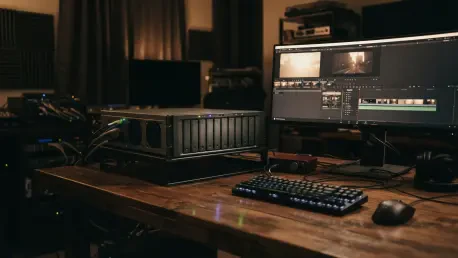

The challenge of managing fragmented data across multiple aging devices often results in significant maintenance overhead and physical clutter for high-output content creators. As production standards in 2026 continue to escalate toward 8K resolution and high-bitrate RAW formats, the limitations of traditional storage methods have become more pronounced. Many professionals find themselves navigating a maze of external solid-state drives, assorted portable units, and legacy servers that no longer provide the necessary throughput for real-time editing. This fragmentation not only risks data loss but also consumes valuable creative time through manual file tracking and redundant backup procedures. The introduction of high-capacity network-attached storage solutions represents a fundamental shift in how digital assets are preserved and accessed, moving away from temporary fixes toward a centralized, professional-grade infrastructure. By consolidating various storage needs—from family archives to high-bandwidth professional footage—into a single, high-performance unit, creators can achieve a level of efficiency previously reserved for large-scale enterprise environments. This transition is less about incremental storage expansion and more about establishing a stable foundation for complex, data-heavy workflows that require both speed and long-term reliability.
Physical Engineering: Robust Build and Thermal Management
Structural Integrity: The Aluminum Chassis
The industrial-grade build quality of the DXP8800 Ultra is immediately apparent through its solid aluminum chassis, which distinguishes it from the plastic-heavy designs common in the consumer market. This choice of material is not merely an aesthetic preference but a critical engineering decision that directly impacts the longevity of the internal components. Aluminum serves as a massive passive heat sink, facilitating the efficient transfer of thermal energy away from the eight internal hard drives. Since heat is the primary factor in the degradation of spinning platters and sensitive controller boards, the ability of the case to dissipate warmth helps maintain a stable operating environment. This is especially vital during the intensive read and write operations associated with large-scale data migrations or high-resolution video rendering, where internal temperatures can spike rapidly. The weight and rigidity of the metal also assist in dampening the vibrations generated by multiple high-speed drives, leading to a quieter and more stable desktop presence.
Beyond its thermal properties, the aluminum construction provides a level of physical protection that is necessary for professional environments where hardware might be subject to occasional movement or accidental contact. The premium finish is resistant to the scuffs and wear typical of a working studio, ensuring that the device remains a professional centerpiece for years. The design philosophy emphasizes durability and functional elegance, aligning the device with other high-end workstation peripherals. By integrating the cooling benefits of the material directly into the structural frame, the engineering team has reduced the reliance on high-speed, noisy fans for basic cooling tasks. This results in a system that can manage substantial thermal loads without creating an intrusive acoustic environment, which is a significant advantage for creators who record audio in the same space where their storage resides. The marriage of form and function here sets a high bar for what professional-grade storage should look and feel like in a modern creative suite.
User Experience: Tool-less Maintenance and Filtration
Maintenance accessibility is a core pillar of the DXP8800 Ultra design, evidenced by the inclusion of eight hot-swappable drive bays that feature a sophisticated tool-less mounting system. Traditionally, installing or replacing drives in a high-capacity server involved the tedious manipulation of tiny screws and brackets, a process that increased the risk of mechanical error or physical damage. This system allows users to secure drives simply by engaging a locking tab and clicking the drive into its designated slot. Such a design is particularly beneficial for professionals who need to scale their storage capacity quickly as projects grow or for those who utilize a rotating drive strategy for off-site backups. The seamless interaction between the drive cages and the internal backplane ensures a secure connection every time, minimizing the troubleshooting often associated with manual drive installation and ensuring that the high-speed data paths remain uninterrupted by physical instability.
In addition to the refined bay design, the inclusion of a magnetic, removable dust filter on the rear of the chassis demonstrates a keen understanding of long-term hardware health. Dust accumulation is a silent killer of electronic components, as it insulates heat and can lead to short circuits in humid environments. By placing a high-quality filter over the primary air intake, the system remains clean internally, reducing the need for aggressive cleaning with compressed air which can sometimes damage delicate fans or sensors. This filter can be removed and cleaned in seconds, encouraging regular maintenance that significantly extends the lifespan of the dual 120mm fans and the motherboard components. The shift to standard 120mm fans with 4-pin connectors also offers a path for enthusiasts to customize their cooling profiles with aftermarket solutions, providing a level of modularity that is rare in the proprietary world of network-attached storage. These thoughtful touches collectively enhance the ownership experience by making the “dirty work” of hardware upkeep nearly effortless.
Computational Infrastructure: Processing and Stability
Processor Performance: The Intel Core 7 Integration
The internal architecture of the DXP8800 Ultra is anchored by the Intel Core 7 150U, a laptop-class processor that provides a massive leap in performance over the lower-tier chips typically found in desktop servers. With a configuration of 10 cores and 12 threads capable of boosting up to 5.4GHz, this processor is specifically chosen to handle the heavy computational demands of modern creative workflows. This overhead is essential for tasks such as real-time 4K video transcoding, where the system must reshape media files on the fly for various playback devices. Unlike underpowered units that might stutter or fail when multiple users access transcoded streams, the Core 7 maintains fluid performance even under significant multi-user loads. This makes the device an ideal solution for small creative teams where several editors might be pulling assets or reviewing footage simultaneously, as the processor can distribute tasks across its multiple cores without saturating the system’s resources.
The presence of this high-performance silicon also opens the door for advanced virtualization and containerization, allowing the NAS to function as much more than a simple storage box. In 2026, many creators are running local instances of AI models, web servers, or dedicated render nodes directly on their storage hardware to save space and reduce the power consumption of maintaining multiple machines. The Core 7 150U provides the necessary instructions and clock speeds to run these virtual environments with minimal overhead. Whether it is managing a suite of Docker containers for automated media processing or hosting a virtual machine for legacy software, the computational headroom ensures that primary storage tasks are never compromised by secondary background processes. This versatility transforms the device into a comprehensive home or small-office server that can grow alongside the user’s technical requirements, providing a level of future-proofing that is vital in an era of rapid technological evolution.
System Integrity: Memory ECC and OS Isolation
Reliability is further reinforced by the memory architecture, which supports up to 96GB of DDR5 RAM across two slots. While many consumer devices ship with minimal, non-expandable memory, the DXP8800 Ultra provides the flexibility needed for data-intensive operations. The support for on-die ECC (Error Correction Code) is a standout feature at this price point, offering a critical layer of protection against single-bit errors. In high-capacity storage environments, a single bit of corrupted data in the RAM can lead to system crashes or, worse, the silent corruption of files being written to the disk array. By detecting and correcting these errors in real-time, the memory system ensures that the integrity of the data remains uncompromised during long transfer sessions. This is particularly important for professionals who are archiving sensitive masters or large databases where even a minor error could result in the loss of critical information or hours of rework.
The system also employs a dedicated 128GB SSD to house the UGREEN Operating System, a design choice that prioritizes data safety and system uptime. By separating the operating system from the primary storage pool, UGREEN ensures that any issues with the OS—such as a failed update or a software conflict—do not put the user’s actual data at risk. This isolation also allows the primary drive array to focus entirely on data storage and retrieval, rather than being bogged down by the frequent small read/write operations required by the operating system’s background tasks. It also simplifies the process of upgrading or reinstalling the system software, as the data drives can remain untouched and secure throughout the process. This tiered approach to hardware architecture reflects a professional-grade philosophy that values the separation of concerns, ensuring that the core mission of the device—safekeeping data—is never hindered by the complexities of the software environment that manages it.
Connectivity and Storage Capacity: A Professional Hub
High-Speed Interfaces: Thunderbolt 4 and Network Throughput
The connectivity suite of the DXP8800 Ultra is tailored for high-bandwidth professional workflows, prominently featuring dual Thunderbolt 4 ports on the front of the unit. These ports provide a theoretical 40Gbps of bandwidth, allowing for a direct, high-speed connection between a creative workstation and the storage pool. For video editors working with high-bitrate footage, this capability is revolutionary, as it enables the editing of complex timelines directly from the NAS without the latency or bandwidth bottlenecks typically associated with standard gigabit networking. This direct-attach approach essentially allows the NAS to function as a massive external drive when needed, providing the flexibility to work at maximum speeds without requiring an expensive overhaul of the existing network infrastructure. It is an ideal solution for creators who need to move terabytes of raw footage quickly from their cameras or local drives into the centralized storage environment.
For broader network integration, the rear of the unit is equipped with two 10GbE ports, which can be bonded to provide up to 20Gbps of total throughput. This massive networking potential is essential for environments where multiple users are accessing the same assets simultaneously, ensuring that no single user can saturate the connection. In a modern studio where several editing bays might be connected to the same central server, this level of bandwidth ensures that 4K and 8K playback remains smooth across the entire network. The inclusion of an SD 4.0 card reader on the front panel further enhances the device’s role as a media hub, allowing for the rapid ingest of camera data without needing separate dongles or adapters. Together with multiple 10Gbps USB-A ports and an 8K HDMI port for direct monitoring, these interfaces create a versatile ecosystem that handles everything from initial data capture to final media delivery with professional-grade efficiency.
Scalable Storage: Capacity Limits and NVMe Acceleration
The sheer storage potential of the DXP8800 Ultra is staggering, supporting up to 256TB of raw capacity across its eight primary bays when populated with high-density 32TB drives. This massive volume is supplemented by two internal M.2 NVMe slots, which can add another 16TB of ultra-fast storage or serve as a high-speed cache. The ability to reach a total of 272TB in a single desktop-sized chassis allows creators to consolidate years of work into a manageable and searchable repository. This level of scale is vital for professionals who must maintain deep archives of their raw footage and project files for potential future use or legal compliance. By having all this data online and accessible, rather than stored in a drawer on various loose drives, professionals can leverage their past work more effectively, quickly retrieving assets for new projects or retrospectives without the hassle of locating and mounting legacy hardware.
The M.2 NVMe slots play a crucial role in maintaining system performance as the storage pool grows. By configuring these fast drives as a read/write cache, the system can significantly accelerate the handling of frequently accessed files and small, random I/O operations that would otherwise be slowed down by the mechanical nature of traditional hard drives. This results in a much more responsive user experience when browsing through thousands of thumbnails or working with complex metadata-heavy databases. For users who prioritize speed over sheer volume, these slots can also be configured as a separate high-speed storage tier for active projects, providing the benefits of all-flash performance while the slower, larger hard drives handle the bulk storage of archived material. This tiered storage strategy ensures that the DXP8800 Ultra can adapt to a wide variety of usage patterns, providing either massive capacity, high speed, or a balanced combination of both as the user’s needs evolve.
Software Ecosystem and Professional Automation
Management Logic: UGOS and RAID Redundancy
The UGREEN Operating System (UGOS) serves as the software bridge that makes the hardware’s power accessible to the user, offering a clean and modern interface for managing complex storage tasks. In 2026, the maturity of this platform allows for the seamless configuration of various RAID levels, including RAID 0, 1, 5, 6, 10, and JBOD. For an eight-bay system, the implementation of RAID 6 is strongly encouraged, as it provides the necessary safety net of double parity. This means that even if two drives fail simultaneously—a scenario that becomes increasingly possible as drives age or during the high-stress period of a RAID rebuild—the data remains intact and the system continues to function. The software’s ability to manage these complex mathematical parity calculations in the background, without impacting the user’s foreground performance, is a testament to the optimization of the UGOS platform and the power of the underlying Intel processor.
Beyond basic storage management, the software environment is designed to be a hub for productivity, offering a range of built-in applications and support for third-party services. The interface is intuitive enough for those new to network-attached storage, yet it provides the deep configuration options required by advanced “home lab” enthusiasts and IT professionals. Users can easily set up user permissions, manage remote access via secure protocols, and monitor the health of their drives through detailed S.M.A.R.T. data and temperature logs. The software also handles automated background tasks such as data scrubbing, which periodically checks the integrity of the stored files to prevent “bit rot” and ensures that the long-term archive remains healthy. This proactive approach to data management is what separates a professional storage solution from a simple external drive, providing peace of mind to creators who cannot afford to lose a single frame of their work.
Workflow Optimization: Custom AI and Automation Scripts
The real-world utility of the DXP8800 Ultra is best demonstrated through its ability to host custom automation and AI-driven workflows that transform how creators handle their media. One of the most impactful applications is the creation of automated storage optimization tools, such as scripts that monitor project folders and compare them against published content on platforms like YouTube. For instance, a system can be configured to recognize when a video project has been finalized and uploaded, subsequently initiating a countdown for the deletion of bulky raw footage that is no longer needed. This “Project Vault” approach ensures that valuable storage space is cleared of “stale” data automatically, while keeping the essential project files and final masters in permanent storage. On high-output channels, this can lead to the recovery of several terabytes of space every month without any manual intervention from the editors.
Further expanding on these capabilities, the NAS can serve as a 24/7 media processing station that utilizes AI to streamline the content creation pipeline. By running local instances of metadata recognition tools, the system can automatically download high-quality trailers or source footage from publisher channels, identify the content, and organize it with appropriate thumbnails and descriptions. For creators who manage large libraries of assets, this eliminates hours of tedious manual data entry and organization. Additionally, the device can handle complex tasks like AI-driven transcriptions or subtitle generation using models like Whisper AI, working in the background to make media libraries more accessible. These automated workflows leverage the “always-on” nature of the server, turning it into a proactive assistant that prepares assets and manages the environment while the creator focuses on the high-level tasks of writing and editing.
Strategic Evaluation: Operational Realities and Recommendations
Practical Limitations: Thermal and Memory Considerations
Despite the overwhelming strengths of the hardware, a professional evaluation must account for certain design choices and potential bottlenecks that users should address during the initial setup. A primary consideration is the base memory capacity; shipping a top-of-the-range device with only 8GB of RAM is often seen as inadequate for the target audience of power users and professionals. For those intending to run multiple Docker containers, virtual machines, or AI-driven tasks, a memory upgrade is effectively a mandatory expense to unlock the full potential of the Core 7 processor. Without this expansion, users may find the system’s performance throttled during heavy multitasking, as the operating system and background services quickly consume the limited available memory. Investing in a high-quality 32GB or 64GB kit of DDR5 RAM ensures that the system can handle the diverse workloads for which it was designed without compromise.
Another minor operational detail involves the thermal management system’s airflow direction. While the dual 120mm fans provide excellent cooling for the internal drives and the processor, some users have noted that a portion of the heat is exhausted through the front of the unit. In a typical desktop environment where the NAS is placed in close proximity to the user, this can lead to a noticeable warm air current directed toward the workspace. While this does not affect the performance or safety of the hardware, it is a factor to consider when planning the physical layout of a studio. Users might find it preferable to place the unit on a side table or in a well-ventilated cabinet where the airflow does not interfere with their comfort. Understanding these nuances allows professionals to optimize their setup from day one, ensuring that the device integrates smoothly into their creative environment without unexpected physical or performance-related hurdles.
Implementation Guidance: Safe Migration and Redundancy
The decision to migrate to a centralized storage system proved to be a transformative step for those managing high volumes of digital assets. The transition allowed for the consolidation of multiple aging units into a single, high-performance repository, which simplified the administrative burden and reduced the total power footprint of the studio. During the migration process, it became evident that a “trust but verify” approach was essential. Even with modern operating systems and high-speed connections, the sheer volume of data involved—often reaching tens of terabytes—can occasionally lead to transfer errors that go unnoticed by basic copy commands. Professionals learned to utilize read-only comparison checks and checksum verification before decommissioning their old drives, ensuring that every file was moved with perfect integrity. This methodical approach to data migration prevented potential losses and provided a clean start for the new storage environment.
The long-term strategy for using a device of this scale centered on the non-negotiable requirement for RAID 6 redundancy. In an eight-bay configuration, the peace of mind provided by a two-drive failure tolerance was deemed well worth the trade-off in raw storage capacity. It was also noted that the NAS should not be viewed as a standalone backup solution, but rather as the primary tier of a broader data protection strategy. This included maintaining off-site backups of critical masters and using the NAS’s built-in cloud synchronization tools to keep essential files mirrored in a secondary location. By treating the DXP8800 Ultra as the core of a comprehensive data ecosystem, creators were able to focus more on the creative aspects of their work and less on the technical anxieties of data management. The hardware ultimately lived up to its promise as a powerhouse, providing the speed, safety, and scalability required to support the next generation of high-resolution digital content.