
Digital storage solutions in the current era often force a compromise between the lightning-fast responsiveness of solid-state technology and the expansive, cost-effective volume provided by mechanical platters. While flash memory has become the standard for boot drives and active project files, the sheer scale of modern high-resolution media libraries makes relying solely on Solid State Drives a prohibitively expensive endeavor for most professionals. This persistent gap has necessitated the development of innovative external drives that bridge the divide between high-capacity desktop units and highly portable, bus-powered peripherals. The Seagate One Touch 3.5-inch drive emerges as a specific response to this challenge, addressing the common complaint regarding the cumbersome external power supplies that usually accompany high-capacity desktop storage. By engineering a high-capacity mechanical drive that operates entirely through a single cable connection, the hardware offers a streamlined solution for modern minimalist workspaces.
Physical Design and Structural Features
Form Factor and Portability: Beyond the Power Brick
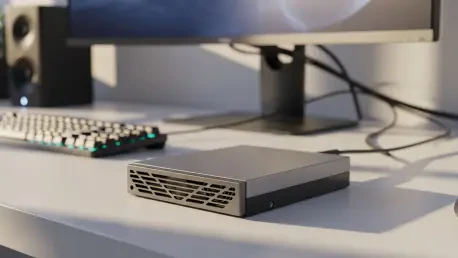
The physical presence of the drive reflects a sophisticated industrial aesthetic characterized by a dark gray and pewter finish that integrates seamlessly into a professional environment. Its chassis features distinctive wavy lines that not only provide a tactile texture but also elevate the visual appeal beyond the typical flat plastic enclosures found in budget-tier storage products. Despite its large 3.5-inch internal component, the unit maintains a manageable footprint, measuring just over seven inches in length and weighing approximately two and a half pounds. This substantial weight gives the device a sense of premium durability, though it remains significantly lighter and more portable than traditional desktop drives due to the absence of a bulky AC power brick. The omission of this external component is the defining design choice, allowing the drive to be slipped into a laptop bag or moved between workstations without the logistical headache of locating multiple outlets or managing extra cables.
Maintaining such a large mechanical drive without a dedicated power supply required a specialized internal architecture that balances physical protection with weight efficiency. The enclosure is primarily constructed from high-grade plastics and metal accents, providing a rigid shell that protects the sensitive internal platters from minor environmental pressures. While the drive is too large to be considered pocket-sized, its ability to draw all necessary operating current from a host device transforms it into a viable option for field researchers and traveling creative professionals who require multi-terabyte storage on the go. This shift away from the traditional stationary desktop model allows for a more fluid workspace where high-capacity storage is no longer anchored to a specific desk or power strip. Consequently, the drive serves as a bridge between the hyper-portability of small mobile drives and the massive, static capacities traditionally associated with professional-grade external desktop enclosures.
Stability and Thermal Management: Ensuring Mechanical Longevity
Stability and thermal management are addressed through several strategic design elements located on the underside and rear of the enclosure. The bottom of the device is equipped with rubberized feet designed to grip desk surfaces and prevent accidental sliding during operation, which is critical for protecting spinning mechanical platters. However, the weight distribution can feel slightly front-heavy, necessitating placement on a stable, level surface to ensure the internal motor operates without unnecessary vibration or physical stress. Cooling is handled through integrated ventilation ports discreetly carved into the plastic sections of the housing, facilitating a natural airflow that keeps internal temperatures within safe parameters during intensive read and write cycles. The rear interface is purposefully minimalist, featuring a single USB-C connection and a subtle LED status indicator that confirms power and data activity, keeping the overall aesthetic clean and uncluttered.
The integration of ventilation is a critical factor for mechanical drive longevity, as heat is the primary enemy of the delicate magnetic heads and spinning disks inside the unit. Unlike solid-state drives that can withstand higher thermal ceilings, this 3.5-inch model relies on consistent air exchange to prevent the build-up of heat during hours of continuous data archiving. The design team successfully balanced the need for an enclosed, protective shell with the requirement for passive cooling, ensuring that the drive remains quiet while effectively dissipating thermal energy. By placing the ventilation along the seams where the metal and plastic components meet, the engineers created a path for heat to escape without compromising the structural integrity or exposing the internal components to excessive dust. This attention to thermal detail ensures that the drive can handle the rigors of long-term storage tasks, such as full-system backups or the transfer of massive video production folders.
Power Delivery and Performance Standards
Navigating the 15-Watt Power Threshold: Hardware Compatibility
The most critical technical requirement for operating this high-capacity drive is its reliance on a consistent 15-watt power delivery through the host interface. Because mechanical 3.5-inch platters require significantly more energy to spin up than smaller 2.5-inch drives or solid-state components, this unit is not compatible with every legacy USB port. To successfully initialize and maintain data transfers, the drive must be connected to a high-output port, such as those found on USB4 or Thunderbolt 3 and 4 interfaces commonly available on modern laptops and high-end motherboards. Users must verify their hardware specifications to ensure their USB-C ports are rated for at least 15W power delivery, as connecting the drive to a standard 5W or 7.5W port will likely result in a failure to mount or erratic disconnects. This dependency on modern power standards reflects the drive’s positioning as a tool for up-to-date workstations rather than a universal accessory for older systems.
Ensuring a stable connection often involves using the specific high-quality cables provided by the manufacturer, as third-party cables may not always support the necessary wattage for peak operational performance. When the drive is properly powered, it enters a state of readiness characterized by a smooth spin-up process that is audible but not disruptive to a quiet office environment. The requirement for a 15W supply also means that using the drive through unpowered USB hubs or older display-integrated ports may lead to insufficient current, causing the drive to cycle power or fail during critical write operations. This technical constraint necessitates a deliberate approach to setup, where the drive is prioritized for a direct connection to the primary host device or a certified high-power docking station. For users with the correct hardware, the convenience of a single-cable setup outweighs the limitations, providing a high-capacity storage solution that remains remarkably simple to deploy.
Benchmark Analysis and Consistency: Performance Under Pressure
In terms of data throughput, the Seagate One Touch occupies a specific performance bracket that outperforms traditional portable hard drives while remaining below the speeds of high-end SSDs. Synthetic benchmarks reveal that this model consistently delivers sequential read and write speeds approximately 80MBps faster than standard 2.5-inch bus-powered drives, thanks to the inherent performance advantages of its larger internal platters. While it cannot match the near-instantaneous file access of a NVMe-based external drive, it provides a stable and predictable flow of data that is ideal for large-scale file transfers and media playback. This performance profile creates a “sweet spot” for users who prioritize massive storage volume over extreme speed, offering enough bandwidth to handle 4K video editing archives and extensive RAW photo libraries without the significant lag or thermal throttling often seen in smaller, more compact mechanical drives. It serves as a reliable workhorse for tasks where sustained capacity is the primary metric.
The reliability of a drive is often tested during sustained workloads where hundreds of gigabytes of data are moved in a single session. Unlike many portable drives that suffer from performance degradation as internal caches fill or temperatures rise, the Seagate One Touch maintains a consistent pace throughout long-term archiving tasks. This stability is particularly beneficial for creative professionals who need to offload entire shoot days or perform full system backups without monitoring the progress for speed drops. While the drive may feel slower when handling thousands of tiny documents compared to a flash drive, its efficiency with large contiguous files makes it an excellent choice for long-term data preservation. The mechanical nature of the drive does require more careful handling during operation, as the physical spinning of the disks makes it susceptible to damage from sudden impacts. Consequently, the drive is best utilized as a semi-stationary storage hub that provides portability without compromising on desktop-class volume.
Market Positioning and Strategic Implementation
Economic Efficiency and Capacity: Comparing Storage Investments
When evaluating the financial investment required for high-capacity storage, the Seagate One Touch presents a compelling value proposition relative to both external SSDs and traditional desktop drives. At the 8TB capacity mark and beyond, the cost per gigabyte remains significantly lower than any comparable bus-powered solid-state alternative, which can often cost several times more for a fraction of the storage space. This model currently pushes the boundaries of bus-powered capacity, offering configurations up to 24TB that were previously only available in massive, AC-powered multi-bay enclosures. For budget-conscious users who need to store vast amounts of data without the recurring costs of high-tier cloud storage or the complexity of a Network Attached Storage system, this drive provides a straightforward and economical path. It avoids the premium pricing often associated with “gaming” branded peripherals while delivering the enterprise-level capacity necessary for serious data collection and professional archiving.
Recognizing the inherent risks associated with mechanical storage, Seagate has integrated a comprehensive safety net for users through its included service packages. Every unit comes with a two-year limited warranty and specialized Rescue Data Recovery Services, which provide professional assistance in the event of hardware failure or accidental data loss. This inclusion is a significant value-add for a drive that might be transported between locations, as it offers a layer of security that is rarely found with standard external storage products. While it remains vital for users to adhere to the traditional “rule of three” for backups—maintaining three copies of data on two different media types with one stored offsite—the specialized recovery service acts as a final line of defense for irreplaceable assets. This proactive approach to data integrity acknowledges the high stakes involved when storing up to 24TB of information on a single device, ensuring that professionals can trust the drive with their most critical project archives and historical records.
Strategic Integration: Professional Workflow Implementation
Optimizing a professional data management strategy required a thorough assessment of the specific hardware environment and the intended frequency of file access. The transition to a bus-powered 3.5-inch storage solution simplified workstation logistics by removing the need for dedicated AC outlets, although this shift necessitated a careful verification of host port power specifications. Professionals who prioritized high-capacity archiving over the extreme speeds of flash memory found that this specific drive model offered a unique middle ground, balancing cost efficiency with modern connectivity standards. Protecting the integrity of the stored information involved utilizing the included recovery services as a secondary precaution while maintaining rigorous primary backup schedules. Moving forward, the most effective use of this technology involved integrating it into a broader system where SSDs handled active tasks and the One Touch served as a reliable, high-volume repository. Investing in compatible high-output cables was a necessary step to ensure long-term stability and peak performance across diverse computing platforms.
The decision to adopt a single-cable high-capacity drive often depended on the user’s desire to reduce clutter while maintaining the ability to relocate a massive media library at a moment’s notice. Deploying the Seagate One Touch as a central hub for automated system snapshots proved to be a highly effective way to leverage its vast capacity without occupying valuable high-speed ports needed for low-latency peripherals. Strategic placement on a vibration-dampening surface further enhanced the longevity of the mechanical components, while periodic health checks via diagnostic software ensured that the drive remained in peak operating condition. As data requirements continued to grow, the flexibility of a bus-powered unit allowed for easier scalability within a local network or direct-attached storage setup. Ultimately, the successful implementation of this drive relied on matching its specific throughput capabilities with the appropriate storage tier in a tiered data lifecycle. This approach ensured that the drive functioned as an essential asset for long-term preservation, providing peace of mind through its robust build and specialized recovery support.