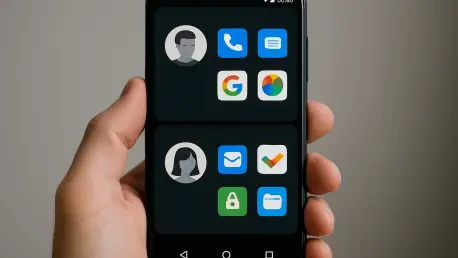

The ability to manage multiple user profiles on a single device remains a distinct advantage for those who need to separate personal data from professional environments. This architectural choice allows for a complete partitioning of applications, notification histories, and security credentials, essentially providing two or more distinct digital personas within a single piece of hardware. While competitors have made strides in creating basic filters, the structural depth of a truly multi-user environment provides a level of privacy that high-level executives and security-conscious professionals find indispensable. By 2026, mobile devices have become the primary computing hubs for the majority of the global workforce, yet the philosophy of the “walled garden” continues to clash with the demand for modularity. Navigating this landscape requires understanding that the choice between operating systems is no longer just about aesthetics but about how much control a user can exert over the underlying system resources.
1. Granular System Customization and Open File Architecture
Beyond visual themes, the fundamental capacity to replace the default system interface with third-party launchers remains a cornerstone of the Android experience. These launchers do more than change icons; they redefine how a user interacts with their notifications, search functions, and gestures. For instance, sophisticated overlays can automate tasks based on location or time, shifting the entire interface from a work-oriented layout to a minimalist personal configuration without manual intervention. This level of granular control extends to the way system animations are handled and how resources are allocated to background processes. While other platforms have slowly introduced more flexible home screen elements, they still dictate the core navigation logic. This disparity highlights a broader philosophical difference: one platform treats the user as a guest in a curated environment, while the other provides a toolbox for building a personalized workspace that adapts to specific cognitive workflows.
The direct manipulation of the internal file system remains another area where the experience significantly diverges from more restrictive alternatives. Professionals who work with large datasets, high-resolution video production, or complex software development require the ability to move files between different directories and external storage media without a proprietary intermediary. Android provides a true file manager experience that mirrors a traditional desktop, allowing for the creation of nested folders and direct access to application caches when necessary. This functionality is crucial for those utilizing high-speed SSDs connected via USB-C to transfer massive amounts of data in seconds. Whereas some ecosystems force every file through a specific application or a cloud-based gateway, the open architecture allows for a more fluid movement of information. This capability is not merely a convenience for power users; it is a fundamental requirement for anyone whose professional output relies on a diverse set of tools.
2. Strategic Implementation and Future Device Selection
The availability of third-party app stores and the simple process of sideloading applications through APK files offer a level of software freedom that remains unmatched. This mechanism allows developers to distribute niche tools that might not meet the broad commercial criteria of a primary marketplace but are vital for specialized industries. For example, specific network diagnostic tools, open-source emulators, and custom corporate applications can be deployed instantly across a fleet of devices without navigating a lengthy and often opaque approval process. This decentralized approach fosters innovation by allowing experimental software to reach an audience without gatekeepers. Furthermore, it empowers users to roll back to previous versions of an application if a new update breaks a critical feature or introduces unwanted changes. This safety net is essential for maintaining business continuity in environments where software stability is prioritized over new features. The autonomy to choose where software comes from remains a powerful deterrent.
The evaluation of mobile operating systems ultimately showed that the persistent gap in functionality was not a matter of technical capability, but of design intent. Users who prioritized total autonomy found that the ability to restructure the operating environment to suit their specific needs was worth the learning curve. It became clear that the freedom to sideload applications and manage files without restriction facilitated a more efficient professional workflow for those in technical fields. Strategic decisions regarding device procurement shifted toward platforms that offered the most versatility in hardware form factors and software permissions. By choosing a system that supported deep customization and multiple user profiles, professionals secured a higher degree of control over their digital privacy and operational efficiency. Moving forward, the recommendation was to maintain a diverse hardware portfolio that avoided total reliance on a single vendor’s services. This approach ensured that as technology continued to evolve, users remained adaptable.